How competitor tracking works
Auto-discovery of brands AI cites alongside yours, share of voice, and the queries where a competitor wins.
Every scan returns two related but different evidence sets: product-brand labels mentioned or recommended in the answer, and domains cited as sources by the engine. A directory, publisher or community can be a useful citation source without being a product a buyer could choose instead of you. Competitors is built from the product-competitor side of that boundary; source evidence remains in citation views.
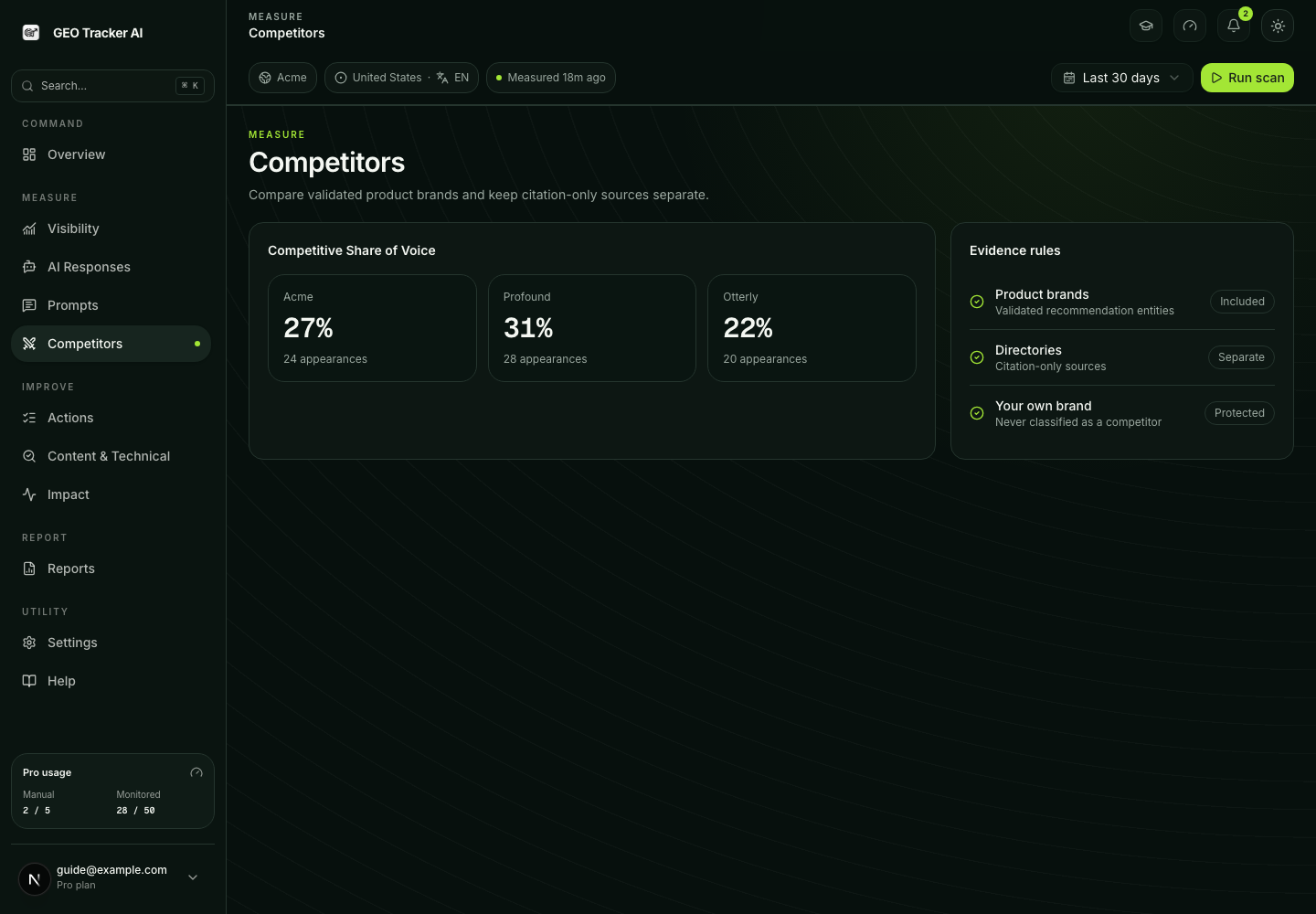
This article explains where the numbers come from, how filtering works, and what the dashboard is and isn't telling you.
Auto-discovery: the data path
After every scan completes, post-processing reads the parsed product-brand mentions and recommendations from the response. Citation domains are stored alongside that evidence, but they do not become product competitors just because an engine cited them. Several checks run before a candidate can enter the competitive cohort:
- Self-brand removal. Your brand, domain and declared aliases are removed — you are never listed as your own competitor.
- Product validation. A candidate must represent a product or service a buyer could plausibly choose instead of you. An unresolved label remains a label; the system does not invent a hostname.
- Source separation. Directories, publishers, communities, social networks, news outlets and AI engines stay in citation evidence. They can explain why an answer won without being mislabelled as a rival.
- Market and vertical filtering. Market-specific comparison sites, marketplaces and ambiguous retailer hybrids are classified using the current business context rather than a universal blocklist.
- Manual seeds. Competitors entered under Settings → Targeting are pinned as known rivals, subject to the plan's tracked-competitor limit.
Validated product brands are normalized and stored for history. Their appearance counts and last-seen evidence update after completed scans; the underlying answer remains available in AI Responses.
Competitors and Share of Voice
The dashboard surface is Competitors. It keeps validated product competitors separate from publishers, directories, communities and other citation-only sources.
Share of Voice
For Starter and higher plans, Competitive Share of Voice is a response-level appearance ratio over the validated product-brand cohort:
your share         = your mention count
competitor share   = each tracked competitor's mention count
"Other tracked"    = sum of remaining tracked competitors below top 5
The window defaults to the last 30 days. Engines without data in the window are absent from the math (they don't drag the percentages).
If the donut shows you at 60% and a competitor at 15%, that means: among response-level appearances belonging to you and the validated product-brand cohort in the selected window, 60% belonged to your brand. It is relative, not absolute, and it is not the share of citation URLs.
"Where you lose"
The list answers a sharper question: on which exact prompts did a tracked competitor appear or get recommended while you did not, in the same scan? We surface up to 10 such queries, sorted by frequency:
- Each row shows the query text, how many losing scans it has, and the competitors who appeared (with their per-row appearance counts).
- The
+Nchip indicates how many more competitors beat you on that query beyond the top four shown inline. - Sorted by
losingScanCountdesc, then bylastSeenAtrecency.
If the list is empty, congratulations — within the current 30-day window, every time a tracked competitor appeared, you did too.
Backlink Authority Gap
On eligible plans, the Authority view takes domains cited on answers that did not mention you, looks up backlink authority in a bounded DataForSEO request, caches the result, and compares each rival with your own domain using an explicit parity band. Page render is a cache read; a paid refresh is tier-gated and cooldown- limited. This is backlink context for a citation gap, not a claim that authority alone caused the AI answer.
Manual curation
You can override auto-discovery any time:
- Pin any auto-discovered competitor to promote it into the tracked list (a tracked one will be demoted automatically if you're at tier limit).
- Hide a tracked competitor that isn't a real rival (publication, loosely related agency).
- Add manually a hostname you expect to compete with even before AI cites them — useful for new entrants.
Manual rows are pinned — they always count as tracked and survive future auto-discovery rebalancing.
What the system doesn't try to do
Trouble-shooting
"Why does Competitors show a brand but an exact prose search does not find it?" Product evidence can come from structured competitor labels or a cited domain even when the excerpt does not contain the exact spelling. AI Responses searches both returned answer text and indexed evidence fields; open the raw answer to distinguish a product appearance from a citation-only source.
"Why did a real competitor drop off my tracked list?" Either you manually hid it, or the auto-rebalance step demoted it because a more frequently cited brand took its slot. Promote it back via the pin icon on the auto-discovered card.
"Group107.com is showing up — that's not a real brand." Rare regex parser misfires on text like "Group 107.com" can land bogus hostnames in the auto-discovered list. Click the trash icon to remove it; the blocklist is updated regularly to catch new patterns.